Showing posts with label broadband. Show all posts

Tuesday, August 16, 2011

Who offers best iPhone Deal ?


I don't know about you ... for years I am not able to tell which telco actually offer better iphone deal than another. All seems like marketing fuss to me. Each has a layout plans that confuse me easily when I switch view from one Telco to another ...

Well, this is my petty try ...
1 phone : iPhone 4
2 model : 16GB & 32GB
3 telcos: Celcom, Digi, Maxis
2 contract periods : 12 & 24 months
1 verdict.
At first I don't really care about usage. I just want to buy an original iPhone that I can get full support. Considering that, it should be cheaper to get it from a Telco than from a retail shop.

Maxis wins hand down on that aspect simply because they offer the lowest monthly package where you pay only $50 per month. So for $129 a month I can own 16GB iPhone 4 and $145 for 32GB model.


But what if I do care about data usage ? ie. 500MB from Maxis $50 package is just not enough. So I analyse the price from the per GB perspective. Surprisingly Celcom comes up to the top picks.


So if you just want the phone, get from Maxis. If you use a lot and don't worry about cash flow, you should properly get it from Celcom.

It seems like no single verdict can be drawn then. I know its lame but the verdict is "it depends on what you want".

This hasn't considered
  • cash flow where the payment options would be important
  • calls and SMS and other goodies that comes with the package
  • telco specific bonus ie. extra free calls, free SMS, free facebook browse etc.
But here is the source document I use, you can go ahead and analyse for your own need : link to spreadsheet

What is your opinion ? Which telco offers the best iPhone deal ?

Sunday, March 6, 2011

Deadly Sins of YES 4G - especially Buzz Phone

DON'T READ if you already BOUGHT from YES !!

Should you really say YES to YTL's 4G ? Well, may be you should consider these deadly sins that I have observed . . .
First of all, they said, "pay only what you use". But there is a minimum charge of RM 30 every month if you engage one of their packages. As far as I know, this 4G network is a closed network. Meaning the only way you can engage their services is by buying one of their devices. And once you DO NOT use their services anymore, your device is ABSOLUTELY USELESS !! Hence the only way to engage them is by buying one of their packages. So how is that "charge only what you use" with this RM30 monthly ?

Note: You still can BUY their device separately and then TOP UP with credits. In that case, I suppose you will NOT be charge the minimum RM 30 a month. But the question remains . . . You HAVE TO buy their devices ! How is this a fair trade ?

FYI : RM 30 = 1GB usage or 333 SMS or 5 hours 33 minutes.


The next big hu ha is you pay only 9 cents. BUT there is NO WAY you can find out how much you have used so far from your phone. How many calls have you made ? How many minutes have you called ? How many SMS have you sent ? How many MB have you used ?

The only way to find out your usage is by login to their web site. And once you login, all you can view is your usage up to yesterday.


The good thing is, they said login to their web site to check usage does not incur cost. But there is really NO WAY you can tell whether charge does incur or not when you browse to 'their web sites. Simply because there is NO details of your browsing bandwidth.


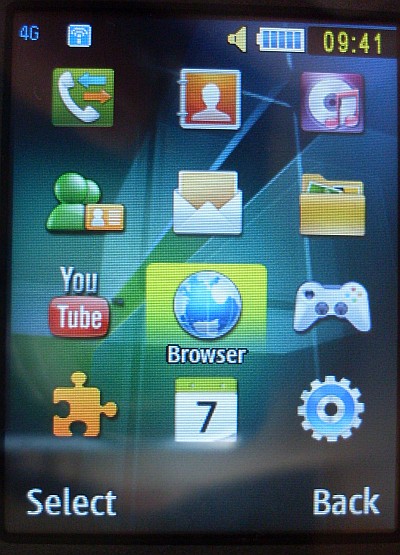
The phone . . . is basically not a phone. It is just a device for you to log in and log out to their 4G network. Below screen shows where you do just that. At the moment you sign in, you basically leave your fate to them. There is NO WAY you can track or measure your usage. There is NO WAY you can find out if there is a background application using bandwidth without asking for your prior approval.


As a matter of fact, in order for 4G phone to work, your phone WILL check the connection and other info 'from time to time' and it will DEFINITELY use some bandwidth. They may say those do not incur charges, but then again there is NO WAY you can be sure either way.

OK, even if we assume YTL is your god and you trust them fully. But once you install some of your own application ie. facebook !? Then how do you tell if that application is continuously using bandwidth even when you are NOT using it !? You DON'T !!

The only way you can CONTROL your usage is by log out of the network. But once you log out, you will not be able to receive call or sms. So you HAVE TO keep yourself login.

You HAVE TO keep yourself login
Once login, you have NO CONTROL of the usage

When you buy the package, you get nothing else but a receipt. So basically you are just buying a 'thing' like any other trade transaction. They DID NOT promise their up time, NOT their coverage and NOTHING about provide you a fair services like a proper way for you to track your usage.


As long as the 'thing' / device you get is still working and their 4G network is still up, you basically have NO LEGAL RIGHTs whatsoever against them. It doesn't matter at all if you can't make call, your sms didn't get delivered and your usage has been abused etc. You just DON'T have any legal rights against all those situations.

You PAID and you GET the 'THING'.
There were NO other service warranty / guarantee at all.

Since when is the voice and internet NOT together ? It has always been internet on top of voice even during those dial up era. Now with their so called 4G, its voice on top of internet. Which really is no different than Skype, which has been existed for ages. Either way, voice and internet has ALWAYS been 'together' !

===

There is a "Auto Sign In" check box on the phone, even if you don't check that, the device will still sign me in without me asking it to do so.

===

Once you login to their web site, your usage up to yesterday will be reported. However, the account details seems NOT changing even after 3 days of usage. Says I have used 9MB so far for example but my total credits in my account remains the same RM XXX. So even if I know my usage, I have no ideas how they are going to charge me in future. We will see but I am quite sure "PREPAID" is suppose to mean deduct immediately after each call/sms/bandwidth usage.

===


yes Buzz 4G Phone Samsung SWD-V100

This is the advs published on Yes web site. After delaying for more than 3 months, this phone is finally launched on 4 March 2011. The phone itself is RM 488. If you get the package RM 1,199 then you get the phone for FREE.


The phone comes in RED and GOLD color. Mine is the RED one. The GOLD one seems a bit yellowish and 'not apparent'.


This side is the Camera button and the interface port. The same port is used for USB data sync and charging. When connected to USB, it will automatically be charged too.


Volume up down buttons and micro SD card slot. It comes with NO extra memory.


. . . when you slide out the keyboard. The keys layout is not that good. You can really type like the way you type on a keyboard. I suspect the spacing between the keys are too wide.

The 'shift' keys are also not that convenient. They called it the Alt key. And the layout for all the Alt keys are not the same as the keyboard. They are actually one row down. If you don't know typing, then the QWERTY layout wouldn't help you neither.

You get a CD to install PC Studio. This piece of software take ages to install and I highly suspect this is a piece of badly written software. My whole system slows down big time after installing this.


The phone's main screen.

This phone main menu screen.


the interface cable, the same goes to USB cable and Power Charge cable.


The back side of the phone. 2MP camera is just alright.

These are the stuff you get in the whole package.


You can go to Lot 10 or KL Sentral to try out the device. Don't bother asking too much technical stuff. Most of the staffs working there have no clue what 4G or Wimax is really about. Nor will they tell you ALL the right stuff. They will give you tons of misleading information anyway.

If you are serious, do all your research online before you go. While on side, just try out the device you want to buy. Then make a decision right there.

When you are buying, just pay and give your IC. Then you will need to pick a number. 30 mins to 2 hours later, your line will be active !

outdated side : yesbuzz4g

Saturday, August 14, 2010

UniFi - Malaysia's High Speed Broadband

Today I got my UniFI installed. Its the FIRST high speed broadband in Malaysia. Considering it quite new, the whole experience is just Marvelous !!

First the installation guy came ( FREE Installation now ), find the nearest fiber optic box ...

The whole things they did outside took about 2 hours ... basically they pulled a fiber optic cable into my place.
then they climb around the house, getting the lines connected.

by default, they just follow the phone line location, then they also follow the Astro line so that they don't need plan any new routes.
This is the box separating 'outside' and 'inside'. The black line above connects to outside, the white line connect into the house.

This is the hole they drilled into the house.

This is the 'white' fiber optic lines - for indoor use.


The whole packages comes with a modem ( The black one ) and a WiFi router ( the white one ). The modem itself also have 4 LAN ports so all together with the router, there are plenty of ports to use.


The cute guy did some test and paper work setting up the whole thing ...


another guy did a little bit praying in front of the computer, hoping I will not complain about the download speed.


This is the TV box. Surprisingly the whole TV viewing experience is great too ! Its really comparable to Astro (satellite cable TV) if not better.


Press 101 to see all the channels


and I have a new wireless phone too. FREE calls to all national land lines.


Tons of boxes left here for me to dive into the technical documents later should I feel like doing so ... but I don't have to cause everything works fine.


The whole process took about 3-4 hours. The tough part is pulling the line from outside into the house. Once that is done and the fiber optic line is 'cap' ... we could have done the rest of the installation in house ourselves.

Now, 5Mbps download speed is really nothing special but the UPLOAD is also 5Mbps !! For those who knows, this means we can host our own servers !!!

More details can be found at UniFi web site

At RM 149 a month with 2 years contract you get
  • a clear TV channels with Video On Demand ( Free 100 points equivalent to about 5-10 movies or 3 sets of TV series ),
  • a wireless phone with FREE national calls
  • fiber optic line 5Mbps, both upload and download !
It may not be the CHEAPEST deal in town but its definitely is a Value for Money deal. The only thing one does NOT want to take this deal is the 2 years contract. Just in case another better technology comes in next year, you are still stuck with this Unifi. But I really don't see that coming.

If you are already paying for your phone line, streamyx and if you only watch basic channels in Astro, its time to SWITCH !!!


Friday, October 23, 2009

Most comprehensive study in Malaysia Broadband service providers


There are literary unlimited choices of broadband services are available in Malaysia now ... yet almost not a single one is satisfactory.

Lets examine how to choose one among all these ....

First lets categorize them
  • unlimited usage : if you will surely use more than 10-20GB a month
  • typical business use : on the run, 10-20GB a month is enough for email etc.
  • cheapest : student, no money, just want to browse net sometimes
  • fastest : speed is everything, price and bandwidth are not problems
Unlimited Usage

Basically you are getting unlimited usage. You probably setup a machine running 24 x 7. So speed doesn't really matter. So lets just choose the cheapest among unlimited usage packages - so called value for money.

Digi $66 PRO: cheapest mobile, no string attached CON: GPRS, slow.
Amax $68 PRO: WiMax 1Mbps, 24 months contract FREE modem CON: Activate $100
Streamyx $66 PRO: no String attached CON: need a telekom line first
iZZi $66 PRO: 6 months contract CON: Activate $82.
Jaring $69 PRO: low users CON: Startup fee $160

Typical Business Use

You are on the run, you need ready access ... so you should choose one package that has the lowest $ per GB. This part is quite straight forward. There are only 2 competent service providers; P1 and Digi. The distinction is also clear; if you use notebook, goes for P1. If you use hand phone, goes for Digi.

P1 $99 PRO: WiMax 1.2Mbps, $4.95/GB CON: cap at 20GB, Activation fee but now FREE
Digi $168 PRO: 2Mbps, no string attached ? CON: cap at 20Gb

other P1 and Digi packages are also OK. Some cap at higher bandwidth, some have cap payment ...

Cheapest

You have no extra money so you would opt for whatever cost lowest for now. If you already have a phone line, use Streamyx. Else try Celcom.

Streamyx $20 PRO: no String attached, 256Kbps CON: Need telecom line, 10 hours usage only
Celcom $38 PRO: no String attached,128Kbps CON: 500 MB usage only
Streamyx $44 PRO: no String attached, 512Kbps CON: GPRS, slow.

Fastest

Almost all are nonsense packages .....

P1 $149 PRO: 10Mbps CON: Cap at 10GB
Time $528 PRO: 6Mbps CON: Half a thousand RINGGIT !?!?


What do you think ? What are your favorites ?

Friday, June 26, 2009

Know and optimize your bandwidth

start monitoring the bandwidth you use, it will help you make the best decision where there are more than 1 service providers eventually.

First of all, monitor your bandwidth using this FREEware called ShaPlus


then read these tips from millionclues


  • Always use Firefox and Opera to browse the web: Both FF and Opera are faster than IE and have got lots of Bandwidth saving features. I use Opera 9.24; since it’s not the latest version available, it doesn’t support some of the newest features in many web applications. For instance, the new version of Gmail pre-fetches the emails for faster performance which is a bandwidth sucker. It loads all emails including those which you have no intention reading at that time.
  • Block unwanted Images: Opera can block images via a button on the View bar. A Firefox Add-on ImgLikeOpera does the same on Firefox. Most websites usually contain lots of animations and images which we don’t even notice. If you need any images, you can always load specific images (Right click > View image on Opera and Right click > Load image on FF). For sites that I frequently visit, I load all the images once and then select the option to ‘load cached images only’ so that the reading experience is not compromised.
  • Block Flash and Adsense: Use the Adblock Plus Firefox Add-on to block Adsense Ads and Flash animations. A flash ad can be as big as 200 kb or even more! This add-on makes pages load faster and saves on bandwidth. If you have ever been to Digg, you might have noticed the number of Ads per page. How fast would the pages load if there were no ads?
  • Remove the Bandwidth Intensive Plugins: Some Firefox Add-on’s like those that bring you the Alexa ranks or Google PR, connect with their server to bring you the stats. If you don’t need those stats, disable those plugins. If you need the stats sometimes, but not every now and then, then create a different Firefox Profile with those plugins.
  • Hibernate Windows instead of Shutting Down: Hibernation saves your desktop the way you left it (Microsoft says that even the mouse location is saved). I save my windows and continue work from last days end. That’s saves a lot of unnecessary pageloads and saves bandwidth!
  • Use Desktop Clients like Pidgin and TweetDeck: Pidgin is an open source chat client that can connect to multiple chat networks at the same time. I use it to connect with my Yahoo and Gtalk friends and clients. Moreover it’s a very light client that doesn’t suck bandwidth the way Gtalk does. TweetDeck is a must have for twitter addicts. It makes the twitter experience more enjoyable by fetching the tweets so that you don’t have to refresh your pages to see if you have new tweets. Saves bandwidth and saves time!
  • Use a Download Manager: A download manager is a definite time saver. I use the Free Download Manger to keep track and organize downloads. Usually I save the download links and videos with FDM and download all of them towards month’s end when you exactly know how much free bandwidth remains. Also you can export the download lists and send it to your ‘Lucky’ friends with unlimited bandwidth and ask them to download it for you!
  • Block Automatic Updates: Most software have the automatic updates enabled by default. The software detects when you are connected to the internet and checks and downloads updates. So you loose control on your bandwidth. Instead, I have disabled all automatic updates and I update all my softwares towards the end of the month, when I know how much usage remains. (Thanks Anish for reminding me!)
  • Disable Opening of Files inline: Browsers open PDF files and Video files inline. It might open a PDF without telling you how big the file is. Worst part, the browser becomes non-responsive until it completes loading the file. Result: You waste bandwidth on a large PDF which you have no intention reading. You can disable that in Firefox Options. Learn how. (Thanks Quakeboy)
  • Monitor your usage: Use a Network monitor to know how much you use and how much bandwidth remains. It helps in planning things better. I use a Free Bandwidth meter from ShaPlus. It’s a good one and has the necessary options. Read the review and download it free.

Tuesday, December 30, 2008

Maxis Broadband Re-Review December 2008

This time I am testing Maxis Broadband again mainly because of the device that comes with it - B932.


  Size : 159 x 105 x 27 mm
  Weight : < 250g 
   HSDPA 3.6Mbps Download 384Kbps UL 
   UMTS 900/2100M 
   GSM/GPRS/EDGE 850/900/1800


Maxis center itself doesn't have this device.  Only a handful agents grab ALL the devices before it was released to the market hence you may only get it from those agents.  Unfortunately I don't know who they are but you can always ask for it.

At first glance, I saw the power adapter is a USB compliant port. So I was thinking this device can be used anywhere with a power supply USB cable.  It would be bulky but rather cost effective.  However, when I finally got the right cable plugged in, it won't power up !  I would guess I may need to configure using 2 USB ports to power this device up but I didn't think its worth while for me to spend that much time and money.

These are the accessories comes in the box. One big missing thing is the antenna, however, the device functions ok without one. Which is also a plus point.


This is how the device look. Quite a lot of blinking colors at front makes it quite cool. This button at the corner is to on / off


The SIM slot is accessible without taking any part of the modem off. This makes it hot plug and play. However, upon testing with Digi broadband with the correct settings, this device still won't work with Digi Broadband.  So I assume this device has been locked for Maxis only.


At the end,

. It cann't power up without power adapter so its not portable ( not that they claim it is )
. I cann't use it with other broadband services so its not a long term device I should keep

With that, there is really no reason why I should keep this package.  Read previous post about limitation on wireless telco broadband service and I could have bought a much better device at lower price and less contractual commitment.

So I had to return this to Maxis again within 7 days.  The difference is this time the return went through quite smoothly.  They didn't give much hard time nor any nonsense excuses.  The staff even 'make up' the reason as 'drop connection' in the form without asking me what the problem was.

Monday, November 24, 2008

Maxis Broadband - bewares ...

7 days FREE Trial ?

When you return the modem and packages in perfect condition, you leave with nothing.  Then you have to wait patiently until they send you your refund in a cheque.  They claimed they will send within 12 weeks.  But sometimes they may come back and see you returned the modem more than 7 days and therefore will enjoy no refund.  Then they will charge you RM 200 extra for terminating in less than 12 months !

No Minimum Contract Period ?

CHEAT again !  If you stop in less than 12 months, you will have to pay RM 200 'handling fee'.  Whatever terms they call it, they want you to stay for 12 months ... even though they said they don't.

Performance

If you have use other mobile phone operated broadband before, then you already know you will almost NEVER get 3G not to mention 3.5G or HSPDA.  You average speed is as good as any GPRS connection, about twice faster than a 56K dial up.

3GB per month ONLY !!

It is NOT highlighted anywhere but you are expected to use up to 3GB per month only !!  After that Maxis will limit your bandwidth, drop your line and totally disable you to use more than that at all !

What kind of Unlimited broadband service is this ?


Related Posts Plugin for WordPress, Blogger...