Showing posts with label hardware. Show all posts

Saturday, March 17, 2012

Samsung galaxy note - move s memo

to me it is NOT intuitive to move a sMemo to a folder. it should have been an easy touch-hold-drag process. then again Samsung is pretty weak in thumbs interface design so far. .. its lacking big time human factor and too much engineering. which original Google android interface has fixed since version 2.1

Tuesday, August 16, 2011

Who offers best iPhone Deal ?


I don't know about you ... for years I am not able to tell which telco actually offer better iphone deal than another. All seems like marketing fuss to me. Each has a layout plans that confuse me easily when I switch view from one Telco to another ...

Well, this is my petty try ...
1 phone : iPhone 4
2 model : 16GB & 32GB
3 telcos: Celcom, Digi, Maxis
2 contract periods : 12 & 24 months
1 verdict.
At first I don't really care about usage. I just want to buy an original iPhone that I can get full support. Considering that, it should be cheaper to get it from a Telco than from a retail shop.

Maxis wins hand down on that aspect simply because they offer the lowest monthly package where you pay only $50 per month. So for $129 a month I can own 16GB iPhone 4 and $145 for 32GB model.


But what if I do care about data usage ? ie. 500MB from Maxis $50 package is just not enough. So I analyse the price from the per GB perspective. Surprisingly Celcom comes up to the top picks.


So if you just want the phone, get from Maxis. If you use a lot and don't worry about cash flow, you should properly get it from Celcom.

It seems like no single verdict can be drawn then. I know its lame but the verdict is "it depends on what you want".

This hasn't considered
  • cash flow where the payment options would be important
  • calls and SMS and other goodies that comes with the package
  • telco specific bonus ie. extra free calls, free SMS, free facebook browse etc.
But here is the source document I use, you can go ahead and analyse for your own need : link to spreadsheet

What is your opinion ? Which telco offers the best iPhone deal ?

Saturday, July 23, 2011

Building more than ONE PC

When building more than one windows computer, its important to prepare the installation media instead of having each computer to download its own which will consume too much bandwidth and too slow. Some of the OEM installation kit or writing network installation script may be too advance for home / SOHO user so the best is to download all the important software and burn them into a CD.

The following is where I download the latest 'Complete' package for my 'Offline' installation ... The sequence follows too ...

Chrome - to browse internet. My habit is not to launch IE until I have virus scanner in place. I have had bad experiences where the first thing the old IE did was to download a virus.

Acrobat Reader - I install this be default. Most of the business documents on web are pdf. Later stage I may want to prepare an installation media that disable auto update by default too.

Avast - Virus scanner of choice
Avast Latest Update - because its easy to update its virus definition, its just an exe file !

Spybot - spyware ad-ware prevention

I install Spybot the last so that it wouldn't keep on asking me if I want to install the virus scanner etc. Minimizing number of clicks is 'important' when you install more than 2 computers.

Once downloaded all above offline installation, it will be just nice to burn them into a CD ( less than 700MB on 22 July 2011 ). But there shouldn't be a worry cause there are DVD and better still, use USB drives. But my environment is filled with tons of OLD PC ... with 256MB RAM and 36X CD ROM is considered 'fast' ....

Other Options

AVG x86 or AVG 64bit - also Virus scanner of choice ... but its harder to update its virus definition so I don't use this normally. AVG Latest Update

Claimwin is the ultimate FREE virus scanner for all systems even server OS. So I always have Clamwin installed side by side with Avast or AVG as a backup. Although improved a lot now, but Clamwin is weak on prevention. Its ok on scanning and killing viruses but its main winning feature is its legally FREE for all to use.

I used to install Zone Alarm but now windows comes with firewall. Although windows firewall doesn't do much but its ok together with Spybot and virus scanner, I find Zone Alarm being redundant nowadays. However, for machines that can't install virus scanner like windows server operating system, I will install Zone Alarm there.

Firefox is also popular but its only good if you really like all those add-ons. I just browse so I don't like Firefox. After all, IE has tons of addons too anyway ...

Thunderbird is the email of choice but old windows comes with Outlook Express, the new windows uses Live Mail. But quite a handful are assessing their emails through web browser too. So I only install Thunderbird if the user needs it.

After the 'important' installations, I then follow with PDFCreator, OpenOffice, Teamviewer, IrfanView, MpcStar ... Oh yea, and lastly I may do the Windows Update the last cause it will take such a long time and reboot so many times ...

Sunday, March 6, 2011

yes Buzz 4G Phone Samsung SWD-V100

This is the advs published on Yes web site. After delaying for more than 3 months, this phone is finally launched on 4 March 2011. The phone itself is RM 488. If you get the package RM 1,199 then you get the phone for FREE.


The phone comes in RED and GOLD color. Mine is the RED one. The GOLD one seems a bit yellowish and 'not apparent'.


This side is the Camera button and the interface port. The same port is used for USB data sync and charging. When connected to USB, it will automatically be charged too.


Volume up down buttons and micro SD card slot. It comes with NO extra memory.


. . . when you slide out the keyboard. The keys layout is not that good. You can really type like the way you type on a keyboard. I suspect the spacing between the keys are too wide.

The 'shift' keys are also not that convenient. They called it the Alt key. And the layout for all the Alt keys are not the same as the keyboard. They are actually one row down. If you don't know typing, then the QWERTY layout wouldn't help you neither.

You get a CD to install PC Studio. This piece of software take ages to install and I highly suspect this is a piece of badly written software. My whole system slows down big time after installing this.

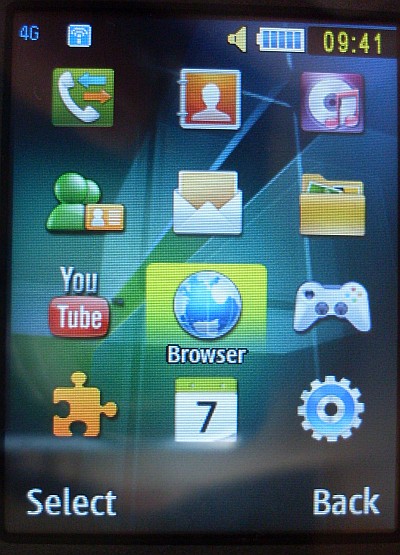
The phone's main screen.

This phone main menu screen.


the interface cable, the same goes to USB cable and Power Charge cable.


The back side of the phone. 2MP camera is just alright.

These are the stuff you get in the whole package.

You can go to Lot 10 or KL Sentral to try out the device. Don't bother asking too much technical stuff. Most of the staffs working there have no clue what 4G or Wimax is really about. Nor will they tell you ALL the right stuff. They will give you tons of misleading information anyway.

If you are serious, do all your research online before you go. While on side, just try out the device you want to buy. Then make a decision right there.

When you are buying, just pay and give your IC. Then you will need to pick a number. 30 mins to 2 hours later, your line will be active !

outdated side : yesbuzz4g

Saturday, August 14, 2010

UniFi - Malaysia's High Speed Broadband

Today I got my UniFI installed. Its the FIRST high speed broadband in Malaysia. Considering it quite new, the whole experience is just Marvelous !!

First the installation guy came ( FREE Installation now ), find the nearest fiber optic box ...

The whole things they did outside took about 2 hours ... basically they pulled a fiber optic cable into my place.
then they climb around the house, getting the lines connected.

by default, they just follow the phone line location, then they also follow the Astro line so that they don't need plan any new routes.
This is the box separating 'outside' and 'inside'. The black line above connects to outside, the white line connect into the house.

This is the hole they drilled into the house.

This is the 'white' fiber optic lines - for indoor use.


The whole packages comes with a modem ( The black one ) and a WiFi router ( the white one ). The modem itself also have 4 LAN ports so all together with the router, there are plenty of ports to use.


The cute guy did some test and paper work setting up the whole thing ...


another guy did a little bit praying in front of the computer, hoping I will not complain about the download speed.


This is the TV box. Surprisingly the whole TV viewing experience is great too ! Its really comparable to Astro (satellite cable TV) if not better.


Press 101 to see all the channels


and I have a new wireless phone too. FREE calls to all national land lines.


Tons of boxes left here for me to dive into the technical documents later should I feel like doing so ... but I don't have to cause everything works fine.


The whole process took about 3-4 hours. The tough part is pulling the line from outside into the house. Once that is done and the fiber optic line is 'cap' ... we could have done the rest of the installation in house ourselves.

Now, 5Mbps download speed is really nothing special but the UPLOAD is also 5Mbps !! For those who knows, this means we can host our own servers !!!

More details can be found at UniFi web site

At RM 149 a month with 2 years contract you get
  • a clear TV channels with Video On Demand ( Free 100 points equivalent to about 5-10 movies or 3 sets of TV series ),
  • a wireless phone with FREE national calls
  • fiber optic line 5Mbps, both upload and download !
It may not be the CHEAPEST deal in town but its definitely is a Value for Money deal. The only thing one does NOT want to take this deal is the 2 years contract. Just in case another better technology comes in next year, you are still stuck with this Unifi. But I really don't see that coming.

If you are already paying for your phone line, streamyx and if you only watch basic channels in Astro, its time to SWITCH !!!


Thursday, September 24, 2009

Mythical Thin Client solution


Thin client solution was promising cost saving and maximizing computer resources. Basically you buy ONE powerful PC and then a whole lots of thin client 'boxes' which allows you to run as-if 10 PCs with 10-30% cost saving initially. One of such company is called Sunde

The saving is not really that big so the thin client company would mention the cost saving is significant when you upgrade. For example, the next time you upgrade, you just need to upgrade the ONE powerful PC and all 10 PCs will become as powerful, so they speak.

Within less than a couple of years, windows XP moves on to Vista and now Windows 7. Guess what, all Sunde old devices CAN NOT support Vista and Windows 7, NOR will they do anything to make their old devices running. The best advice they can give is for all their users to keep using the un-supported XP. They don't even dare to promote their latest devices because it doesn't support Windows 7 and they DON'T KNOW when they will be able to do so. It is most probably another abandon old products totally and create a new product just for Windows 7.

If you go ahead to upgrade the powerful PC, you will need to buy 10 new Thin Client Boxes. Else you mean be left only one working PC. So you may ended up buying a NEW PC and NOT upgrading the old ones. That way, your thin clients are NOT sharing resources for the biggest investment you have just put in. In many ways, such a small one time cost saving comes with a small performance degrade and a huge long term damage.

Not to mention stricthen internal network security may also cause your 10 thin clients to totally stop working or sometimes degrade terribly.

Most of the thin clients sellers 1 year ago are all un-contactable today.

Thin Client .... NOT the way to go in future. Microsoft has stated very clearly that such a resource sharing is violating their license rights.


Saturday, September 19, 2009

ROM upgrades for Dopod P800W and/or HTC P3300


http://wiki.xda-developers.com/index.php?pagename=Artemis_Upgrades

Friday, March 20, 2009

Turn your current monitor TV into iPhone screen ?

With just a USB cable and no power supply needed !?

JUST  USD 2,399  !!

Shipping is only USD 199 for unlimited quantity and deliver world wide.


PQLabs Multi-Touch G² is a touch screen overlay that can be easily mounted onto any LCD or Plasma TV monitors. This simple, lightweight and low cost solution let you deploy Multi-Touch technology instantly to existing monitors without the need of any configuration. Multi-Touch G² is connected to the computer via a USB cable (No power cable is needed).

Thursday, March 12, 2009

FREE iPhone from Maxis

Very soon on 20 March, Maxis will offer iPhone 8GB for FREE if you commit 24 months of RM 375 = RM 9,000 !!

book a seat at their lanching event here
read the news here 

a used one is between RM 2,000 to RM 2,300
a new one is RM 2,500 ( click here to view all )

but I cann't be sure how genuine are those ...

Friday, March 6, 2009

Notebook without keyboard

I once predicted the next break through in computer hardwares is to do away with its input and output devices, ie. the keyboard and the monitor !

And Apple comes up with this, which is one of the biggest joke I have ever seen ....

Tuesday, January 13, 2009

Mojo : Palm WebOS

Palm just announced a new platform, Palm webOS, and the first device on that platform, the Palm Pre™. Developers will be able to build apps on Palm webOS using the Palm Mojo Application Framework and SDK, available for free later year 2009.

In Mojo ... we can tell you that developers will use standard web technologies such as HTML, CSS, and JavaScript to build native Palm webOS applications. So any developer who can create software for the web has a head start developing on our new platform.

Also, if you have a Palm OS application and build a version that runs on Palm webOS, users will be able to migrate data from your Palm OS application to your new application.
You may find more info from Palm

Sunday, November 9, 2008

build your own PC

recently I built another computer.  Just so that you have my perspective, the first PC I built was 8086 more than 15 years ago.

So first I shop for one and found this cost $699 ( MYR )
- Celeron C430 1.8GHz
- 1 GB RAM
- 80GB HDD
- 20x DVD-RW
- 1.44 Floppy
- 56k modem
- 400W power supply
- speakers, keyboard, optical mouse

It seems like agreat deal especially you already have monitor at home.

However, my last few "LOW COST" PC always ended up with un-diagnostable cancer so I decided to pay a bit extra for quality.  So I ended up analysing which CPU and motherboard is best Value For Money in last post.

And then I also always face some problems in those $30-$50 power supply.  Their actual supply power is unknown ( ie. not 400W, not 300W.  sometimes 150W sometimes 120W)  So this time I bought a higher than 80% efficiency power supply.

At the end, this is what I bought :


Abit AN68SV
$150
AMD 62 x2 5000+ $204
DDR2 800 2GB RAM $84
Acbel 510W $177
Total $615

$615 !!!???  Cheaper than the first PC I built ( USD 200 ) with MHz CPU, RAM counted in KB and a beautiful Disk Operating System (DOS) ... haven't these 15 years changed so much!

The total paid is slightly less than what you pay for a complete low cost PC but you don't have the casing, speakers, hard drive etc.  I am fine because I can reuse all those old stuff.

At least I ended up with a good performance CPU with reliable power supply.  The only thing I worry about this new system is how long can the mother board last ?

I may FRY this board as this system will be on 24 x 7


Thursday, November 6, 2008

How to compare Value for Money CPU

Recently I have to build a new PC so I was analysing which CPU is best value for money.

First I got this CPU comparison data


I put the the selling price I obtained from local sellers.  Then basically I just divide the performance marks by price to get an indication what to buy.

From this exercise, I learned the following :

Worst Buy ( More Money, no more value )
Intel E8400
AMD 5600+
Intel E2180

Best Buy ( "Normalize" Value for Money )
Intel E2200
AMD Sempron LE1150
AMD 5000+

Then I examine the mother boards used for Intel E2200 and AMD 5000+.  The graphic in AMD 7025/7050 chipset is so much better than Intel 925/G31.  AMD boards also have more fancy stuff like more support SATA drives by default, dual display, DVI output, support up to 16GB RAM ( although we don't need it but what the heck, we are talking about value for money now, not usage by money )

And AMD motherboard is cheaper than Intel's eventhough with more features.

So I ended up buying AMD 5000+ with Abit AN68SV


Related Posts Plugin for WordPress, Blogger...